Permanent store URL
Send the address ending in .myshopify.com, not your
customer-facing custom domain.
your-store.myshopify.com
 Lance Studio
Shopify store support · Australia
Lance Studio
Shopify store support · Australia
Client onboarding · Shopify access
Lance Studio uses Shopify's official collaborator process. You provide two store details, then review and approve the access request inside Shopify.
What to send
These details let Lance Studio send a request. They do not grant access until you approve it in Shopify.
Send the address ending in .myshopify.com, not your
customer-facing custom domain.
your-store.myshopify.com
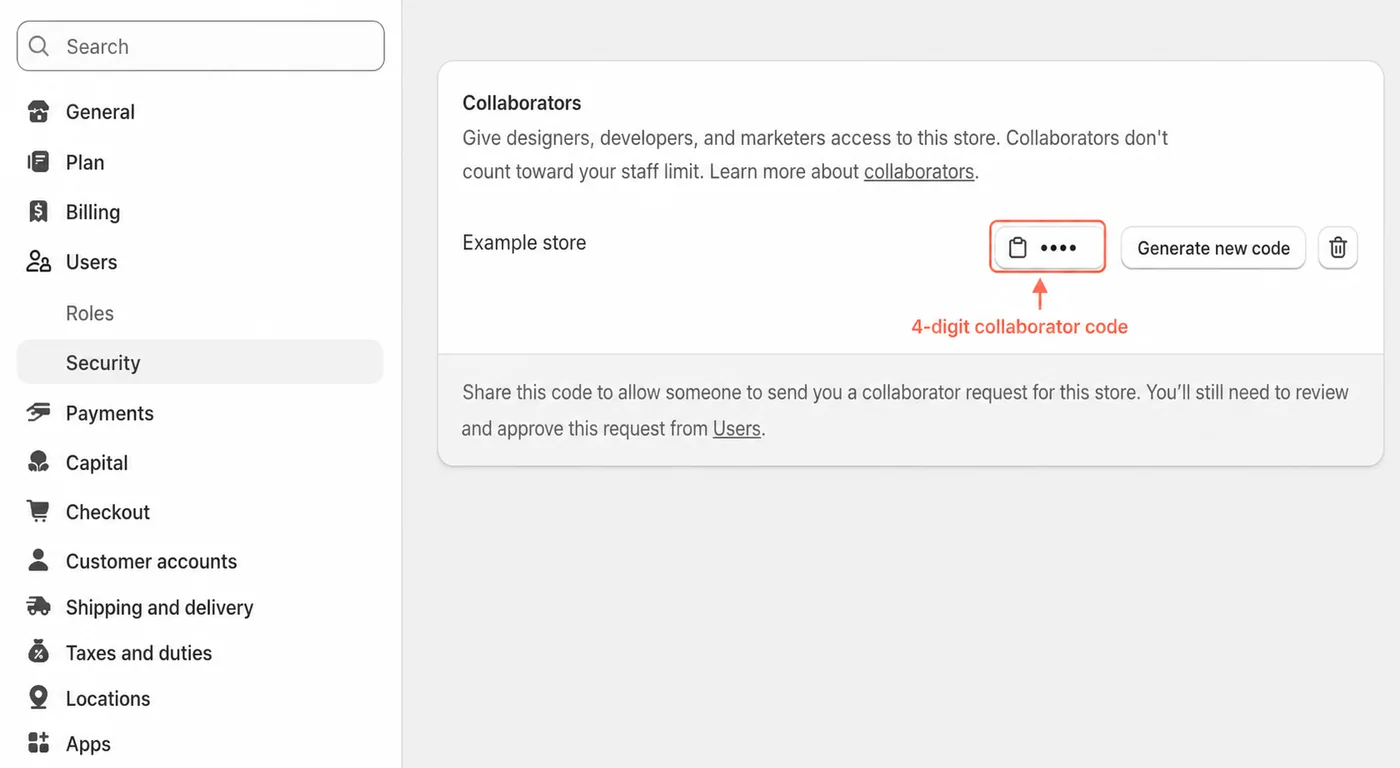
Send the four-digit code shown under Collaborators in your Shopify security settings.
••••
Find the code
Shopify may adjust labels over time, but the code remains within the store's user and security settings.
From Shopify Admin, open Settings in the lower-left corner.
Select Users and open the Security section.
Find Collaborators and copy the code displayed beside your store name.
Security boundary
Lance Studio requests only the permissions needed for the agreed work. You can review the request before approval and revoke access later from Shopify's Users settings.
What happens next
The four-digit code allows a request to be sent. It does not bypass your approval.
Ready after onboarding is confirmed
Use the Lance Studio conversation you already have. Do not send passwords or authentication codes.